
Drum Counter Reset (Drum Reset)
After installing a new Brother DR-2510 drum unit, the printer may continue displaying the message “Replace Drum” or “Drum End Soon”. In this case, a drum counter reset (Drum Reset) must be performed.
Brother HL Series
Models: HL-L2400DW, HL-L2400DWE, HL-L2445DW, HL-L2447DW, HL-L2865DW
- Turn on the printer.
- Close the front cover.
- Press OK and ▲ (Up) simultaneously.
- Select “Drum” on the display and press OK.
- Press ▲ (Up) to confirm the drum counter reset.
- Wait until the drum replacement message disappears.
Brother DCP Series
Models: DCP-L2620DW, DCP-L2622DW, DCP-L2627DW, DCP-L2627DWE, DCP-L2627DWXL, DCP-L2640DW, DCP-L2660DW, DCP-L2665DW
- Turn on the printer.
- Close the front cover.
- Press OK and ▲ (Up) simultaneously.
- Select “Drum” on the display and press OK.
- Press ▲ (Up) to confirm the drum counter reset.
- Wait until the drum replacement message disappears.
Brother MFC Series
Models: MFC-L2800DW, MFC-L2802DW, MFC-L2827DW, MFC-L2827DWE, MFC-L2835DW, MFC-L2860DW, MFC-L2860DWE, MFC-L2862DW, MFC-L2960DW, MFC-L2980DW
- Turn on the printer.
- Close the front cover.
- Press OK and ▲ (Up) simultaneously.
- Select “Drum” on the display and press OK.
- Press ▲ (Up) to confirm the drum counter reset.
- Wait until the drum replacement message disappears.
Note: On some Brother printer models or firmware versions, the button combination may vary slightly.
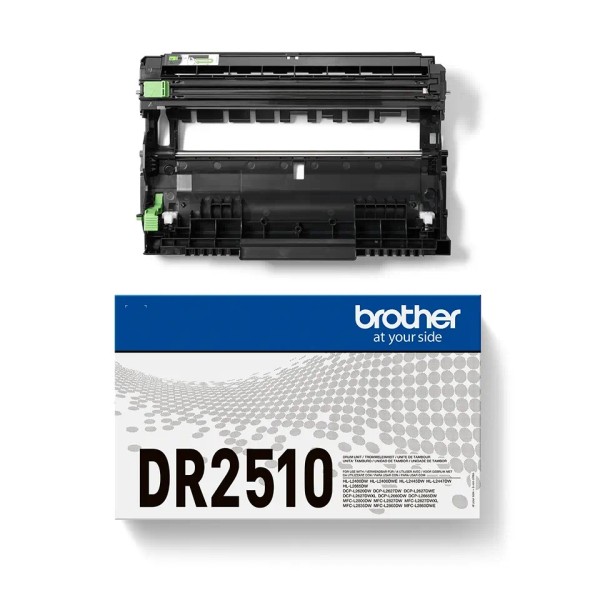
Originalus Brother DR-2510 būgno blokas
Brother DR-2510 – originalus būgno blokas (Drum Unit), skirtas „Brother“ lazeriniams spausdintuvams ir daugiafunkciams įrenginiams. Tai nėra tonerio kasetė – būgnas veikia kartu su TN-2510, TN-2510XL arba TN-2510XXL toneriais.
- Gamintojas: Brother
- Kodas: DR-2510 / DR2510
- Tipas: originalus OEM būgno blokas
- Resursas: iki 15 000 puslapių
- Garantija: 12 mėn.
Suderinami spausdintuvai
Suderinami „Brother“ lazeriniai spausdintuvai ir daugiafunkciai įrenginiai:
- Brother HL serija:
- Brother HL-L2400DW
- Brother HL-L2400DWE
- Brother HL-L2445DW
- Brother HL-L2447DW
- Brother HL-L2865DW
- Brother DCP serija:
- Brother DCP-L2620DW
- Brother DCP-L2622DW
- Brother DCP-L2627DW
- Brother DCP-L2627DWE
- Brother DCP-L2627DWXL
- Brother DCP-L2640DW
- Brother DCP-L2660DW
- Brother DCP-L2665DW
- Brother MFC serija:
- Brother MFC-L2800DW
- Brother MFC-L2802DW
- Brother MFC-L2827DW
- Brother MFC-L2827DWE
- Brother MFC-L2835DW
- Brother MFC-L2860DW
- Brother MFC-L2860DWE
- Brother MFC-L2862DW
- Brother MFC-L2960DW
- Brother MFC-L2980DW
Svarbu po keitimo
Įdėjus naują Brother DR-2510 būgno bloką, gali reikėti rankiniu būdu atlikti būgno skaitiklio atstatymą (Drum Reset). Tai standartinė „Brother“ procedūra, priklausanti nuo konkretaus spausdintuvo modelio.
Būgno skaitiklio atstatymo instrukciją galite rasti skiltyje „Papildoma informacija“.
Kada reikia keisti būgną?
Būgną rekomenduojama keisti, kai spausdintuvas rodo pranešimą apie būgno resurso pabaigą arba spaudoje atsiranda pilkas fonas, dėmės, juostos ar neryškus tekstas.
| Kaina | |
| E-kaina | Kaina galioja tik perkant internetu |
Brother DR-2510 būgnas – Originalus
- Availability:In Stock
- Product code:23526
- Brand:Brother
- Manufacturer code:DR2510
-
94.90 €
- Ex Tax: 78.43 €
Frequently Bought Together
Brother DR-2510 būgnas – Eco
Brother DR-2510 būgnas – Eco Brother DR-2510 Eco – analoginis būgno mazgas, skirtas &..
24.90 € 29.70 € Ex Tax: 20.58 €
Brother DR-2510 būgnas – Premium
Brother DR-2510 būgnas – Premium Brother DR-2510 Premium – aukštos kokybės ana..
32.90 € Ex Tax: 27.19 €
